
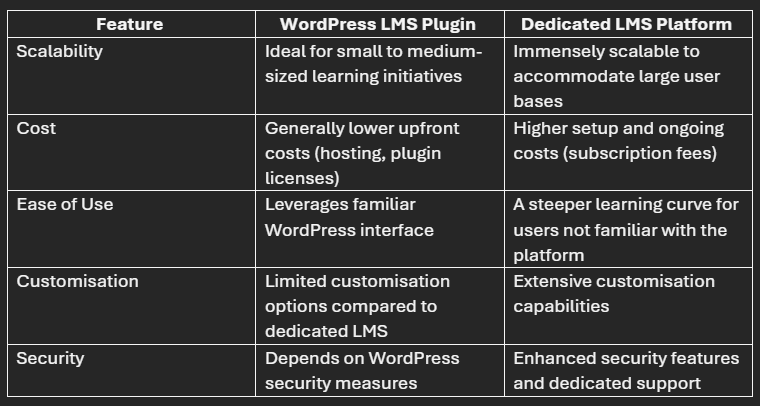
Choosing between a WordPress LMS plugin and a dedicated Learning Management System platform is not really a contest between “cheap” and “professional.” Both approaches can support serious online education. The better choice depends on who will manage the system, how many learners you expect, how much customization you need, what reporting and compliance requirements exist, and whether your organization wants to own the technical stack or outsource more of it. WordPress LMS plugins can turn an existing WordPress site into a course-delivery environment with lessons, quizzes, enrollment, certificates, payments, and learner dashboards. Dedicated LMS platforms, by contrast, are built primarily around learning administration and may provide hosting, reporting, integrations, user management, security, and support as one managed environment. If you are building an online learning business, the important question is not which category has the longest feature list. It is which architecture creates the least friction for your specific operating model.
WordPress LMS Plugin vs Dedicated LMS: Core Difference
A WordPress LMS plugin adds learning-management capabilities to a WordPress website. WordPress.org currently lists multiple active LMS plugins, including Tutor LMS and LearnPress, alongside other course and training tools. Depending on the plugin, features may include: Course creation; Lessons and modules; Quizzes; Student enrollment; Certificates; Prerequisites; Drip content; Instructor management; WooCommerce or payment integrations; Membership integration; Reporting. The plugin operates inside your WordPress installation. That means your hosting, WordPress core, theme, plugins, database, backups, security, and performance all become part of the LMS environment. What is a dedicated LMS platform?. A dedicated LMS is software built primarily to deliver, administer, and track learning. The term covers several models: Cloud/SaaS LMS: the vendor hosts and manages the platform; Self-hosted LMS: your organization installs and manages the software on its own infrastructure; Open-source LMS: systems such as Moodle can be self-hosted or supported through service providers; Enterprise learning platforms: systems designed for large workforces, compliance training, reporting, HR integrations, and complex organizations. A dedicated platform may include functions that WordPress can also provide, but it usually treats learning management as the core application rather than as one capability of a broader CMS. WordPress LMS plugin vs LMS platform at a glance.
| Area | WordPress LMS plugin | Dedicated LMS platform |
|---|---|---|
| Initial setup | Fast if WordPress already exists | Depends on vendor and configuration |
| Website/content flexibility | Very high | Varies |
| Hosting responsibility | Usually yours | Often vendor-managed in SaaS |
| Plugin/theme ecosystem | Large | Platform-specific |
| Enterprise reporting | Can require add-ons/custom work | Often stronger out of the box |
| Compliance workflows | Possible, but implementation-dependent | Often a core enterprise feature |
| Marketing/SEO content | Excellent fit | May require separate website |
| Technical maintenance | Your responsibility or agency/host | Often vendor responsibility |
| Customization | High, especially with development | Varies by APIs and vendor controls |
| Predictability of support | Depends on plugin stack | Often centralized under one vendor |
When a WordPress LMS Plugin Makes Sense
The preserved WordPress.org: LMS plugin directory shows that WordPress still has a large active LMS ecosystem in 2026, including plugins such as Tutor LMS, LearnPress, LifterLMS, and Sensei LMS. That ecosystem is a strength for course businesses already invested in WordPress, but it also means the site owner becomes the integrator responsible for compatibility among the LMS, theme, payments, memberships, analytics, hosting, backups, and security updates. When a WordPress LMS plugin makes sense. You already run your website on WordPress. If the brand, blog, landing pages, checkout, SEO, and content marketing already live in WordPress, an LMS plugin can keep the learner experience in the same ecosystem. You do not necessarily need to operate a separate marketing site and learning portal.
You sell courses directly to consumers. WordPress is particularly attractive for creator-led courses, coaching businesses, membership sites, and publishers because learning can be integrated with: Landing pages; Blog content; Email capture; WooCommerce; Membership plugins; Affiliate tools; SEO plugins. That can reduce the number of disconnected systems a small business has to manage. You need design flexibility. WordPress offers a large theme and page-builder ecosystem. Businesses that care deeply about brand presentation may prefer the freedom to control course sales pages, student dashboards, public content, and site navigation. If the visual layer is important, choosing appropriate WordPress themes and testing their compatibility with the LMS plugin can be part of the project. You have technical support available. A self-managed WordPress LMS is much easier to operate when someone understands updates, backups, staging, caching, database maintenance, security, and plugin conflicts. Without that support, the apparent freedom of WordPress can become operational overhead.
When a Dedicated LMS Platform Is Better
The Moodle Documentation illustrates the dedicated-platform model, where learning administration, roles, reporting, and course delivery are designed as one system. The preserved WordPress Documentation remains relevant on the WordPress side because platform flexibility still comes with a requirement to maintain the underlying CMS correctly. When a dedicated LMS platform is the better fit. You manage employee or compliance training. Corporate learning often requires more than course sales. Organizations may need: Mandatory assignments; Completion deadlines; Manager dashboards; Department hierarchies; Audit records; Recurring certifications; Automated enrollment based on HR data; Detailed compliance reporting. A platform designed for enterprise learning may provide these workflows more naturally than a collection of WordPress plugins.
You need one accountable vendor. With a SaaS LMS, one vendor may be responsible for hosting, platform uptime, security patches, backups, feature releases, and support. With WordPress, responsibility may be divided among the host, LMS vendor, theme developer, payment provider, custom developer, and other plugin vendors. Centralized accountability can be worth paying for. You have a large or complex organization. Large universities, regulated employers, franchises, and multinational companies may require: Single sign-on; Role-based access; Advanced reporting; Multiple business units; Localization; Integration with HRIS systems; Service-level agreements; Accessibility governance; Data-retention policies. These capabilities can be built in WordPress, but the total engineering and governance effort should be compared with buying a platform where they are standard.
Cost, Ownership, and Vendor Accountability
Cost: WordPress is not automatically cheaper. A WordPress plugin may have a lower license price than an enterprise LMS, but total cost of ownership includes much more than the plugin. WordPress LMS costs can include:. Hosting; Premium LMS license; Theme or page builder; Payment gateway fees; Membership plugins; Email platform; Video hosting; Backups; Security tools; Developer time; Performance optimization; Support and maintenance. Dedicated LMS costs can include:. Per-user or per-active-user fees; Implementation fees; Premium support; SSO or integration tiers; Storage or bandwidth; Custom reporting; Data migration; Professional services. Compare costs over three to five years rather than only the first invoice. Content ownership and portability. This is one of the most important long-term questions.
With a self-hosted WordPress LMS, you generally control the database and site files. That gives you substantial access to your own data, but moving courses to a different LMS may still be difficult because each plugin stores course structures differently. With a SaaS LMS, ask: Can all course content be exported?; Can learner records be exported?; What format is used?; Are quiz attempts and certificates exportable?; What happens after the contract ends?; How long does the vendor retain data?. “We own our data” is only useful if you can practically extract and reuse it.
Standards, Reporting, and Integrations
SCORM, xAPI, and learning standards. If your organization purchases e-learning modules from external vendors or needs interoperability with authoring tools, standards support can become a deciding factor. Common terms include: SCORM: widely used packaging and tracking standard for e-learning modules; xAPI: a more flexible approach for recording learning experiences; LTI: commonly used in education to connect learning tools with LMS environments. Not every WordPress LMS supports these standards natively. Some require extensions or third-party services. Enterprise LMS platforms often make standards compatibility a core procurement question.
E-Commerce, Customization, and Scalability
E-commerce and course monetization. For a course creator, WordPress can be exceptionally flexible because the LMS can connect with mature commerce and marketing tools. You might sell: One-time course access; Subscriptions; Bundles; Memberships; Cohort programs; Coaching packages; Digital downloads. A dedicated LMS may also support e-commerce, but its checkout customization and marketing ecosystem can be narrower. If direct-to-consumer sales are central to the business, test the complete buyer journey before choosing.
Security, Accessibility, Performance, and Maintenance
Performance and scalability. A WordPress LMS can support a large audience, but scale depends on architecture. Course pages, logged-in dashboards, quizzes, progress tracking, and checkout behavior are more database-intensive than a simple blog. Scaling may require: High-quality hosting; Object caching; Database tuning; CDN usage; External video hosting; Careful plugin selection; Load testing. SaaS LMS platforms typically abstract these infrastructure decisions away from the customer, although performance still depends on the vendor. Security and updates. WordPress itself is actively maintained, but a WordPress LMS consists of multiple moving parts. Plugins and themes should be updated, backups tested, and unused components removed. A plugin conflict can affect checkout, enrollment, certificates, or course access. That does not mean WordPress is inherently insecure; it means the organization owns more operational responsibility.
A SaaS LMS transfers much of platform patching to the vendor. You still remain responsible for user access, permissions, identity management, content, and organizational security practices. Accessibility. Accessibility should be evaluated in both approaches. A platform may claim accessibility support while a custom theme, embedded video player, quiz tool, or third-party widget introduces barriers. Test: Keyboard navigation; Screen-reader behavior; Form labels; Color contrast; Captions and transcripts; Focus indicators; Quiz interactions; Document accessibility. Accessibility is a property of the complete learning experience, not just the LMS core. Reporting and analytics. Small course businesses may only need enrollment, completion, quiz, and revenue reports. Large organizations may need cohort analysis, compliance status, manager reports, certification expiration, and data feeds into BI tools.
Before choosing a system, write down the reports you actually need. Then verify that they can be produced without manual spreadsheet work. Integrations. List the systems the LMS must connect to: CRM; Email marketing; HRIS; SSO/identity provider; Payment gateway; Video platform; Webinar tool; Accounting system; Analytics; Customer support. A WordPress LMS may connect through plugins, webhooks, APIs, or automation tools. A dedicated LMS may offer certified integrations or enterprise APIs. Neither is automatically better; integration quality matters more than the number of logos on a marketing page. Customization: freedom vs maintainability. WordPress gives developers enormous freedom. That is valuable until customizations make future updates difficult.
Before commissioning custom code, ask whether the requirement is strategically important enough to maintain for years. A specialized LMS development company may help with architecture or integrations when off-the-shelf functionality is not enough, but custom development should have a clear business case and maintenance plan. Support model. With WordPress, support can be fragmented. The LMS plugin vendor may say an issue comes from the theme, while the theme vendor says it comes from another plugin. A managed LMS often has a clearer support boundary, but support quality varies widely. Ask prospective vendors: What response times are promised?; Is support available during your operating hours?; Who handles integrations?; Is phone support available?; How are critical incidents escalated?; Is there a sandbox environment?. Which option is better for different use cases?.
| Use case | Likely starting point |
|---|---|
| Solo course creator | WordPress LMS plugin |
| Content publisher adding paid courses | WordPress LMS plugin |
| Membership community | WordPress LMS plugin or community-focused platform |
| Small company employee training | Either, depending on reporting needs |
| Large compliance program | Dedicated LMS platform |
| University or complex institution | Dedicated education-focused LMS |
| Business with heavy custom commerce | WordPress may be attractive |
| Organization with minimal IT resources | Managed SaaS LMS often easier |
Decision Framework and Migration Planning
A decision framework. Score each option from 1 to 5 on these factors:
- Course-authoring needs
- Number of learners
- Reporting complexity
- Compliance requirements
- Website and SEO importance
- E-commerce flexibility
- Integration requirements
- Internal technical skills
- Support expectations
- Security governance
- Accessibility
- Data portability
- Total five-year cost
Weight the categories that matter most. A platform with fewer total features can still be the better choice if it is stronger in the three areas critical to your business. Questions to ask a WordPress LMS vendor. Which WordPress versions are supported?; How are database migrations handled during updates?; Does the plugin support staging sites?; What happens if the license expires?; Which payment and membership tools are officially supported?; Can course and learner data be exported?; What accessibility testing is performed?; How does the plugin perform with thousands of users?. Questions to ask a dedicated LMS vendor. How is pricing calculated?; What happens if active users spike?; Which data can we export?; What are your uptime and support commitments?; Do you support SSO and our HR system?; Which learning standards are supported?; How is customer data isolated and protected?; How often are platform updates released?; Can we create a sandbox before rollout?.
Can you start with WordPress and move later?. Yes, but migration is easier when planned early. Keep original video files, source documents, quiz banks, course descriptions, learner exports, and media outside any one plugin’s proprietary structure where practical. If growth eventually requires an enterprise LMS, your WordPress site can remain the public marketing site while the dedicated LMS becomes the authenticated learning environment. Overall takeaway. A WordPress LMS plugin is often a strong choice when content marketing, branding, commerce, and flexibility are central and you have the technical ability to maintain WordPress. A dedicated LMS platform is often better when standardized learning administration, enterprise reporting, compliance, centralized support, and large-scale user management are the primary requirements. Do not choose on plugin price or feature count alone. Map the learner journey, administrator workflow, integrations, reporting, support model, security responsibilities, and total cost. The right LMS is the one your organization can operate reliably after the exciting launch phase is over.
Conclusion
A WordPress LMS plugin and a dedicated LMS platform can both support online learning, but they optimize for different priorities. WordPress is attractive when content marketing, direct course sales, design freedom, and ownership of the website are central to the business and the organization has technical capacity to maintain the stack. A dedicated LMS is usually stronger when structured training, compliance, reporting, standards support, enterprise integrations, and a single accountable platform vendor matter more than front-end flexibility. The best choice comes from requirements, governance, and total operating cost—not from assuming that one category is inherently more modern or cheaper.